PRODUCT DATA MANAGEMENT · FOR FUSION'S ENGINEERING PRODUCTS · PLANNEDFusion PDM is Fusion's product data management product. It keeps the files of Fusion CAD, Fusion SIM, Fusion MAT, Fusion CAM and Fusion EDA in one vault: who has a file checked out, every version, revisions given at release, where each file is used, and one bill of materials across mechanical and electronic parts.
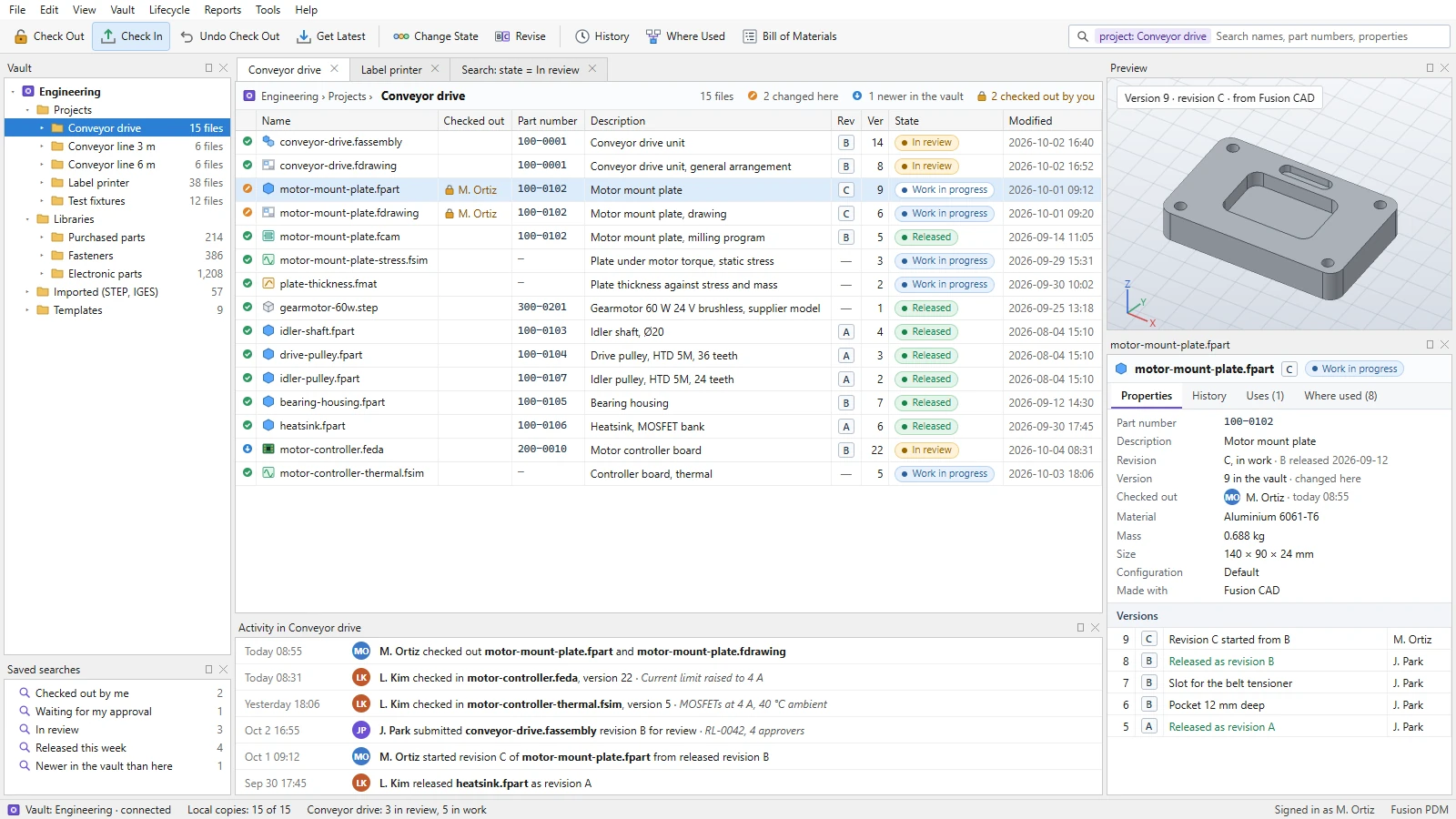
Design mockup: a project in the vault, with the motor mount plate checked out for a change. Illustrative data.
One place for everything the suite makes.
Once a team has hundreds of engineering files, the hard questions are which version is current, who is changing it, and what else a change will touch. Fusion PDM is planned to answer them for every file Fusion's engineering products make, and for the files they import.
Fusion CAD
Parts, assemblies and drawings: .fpart, .fassembly and .fdrawing files.fusioncad.cloud →
Fusion SIM
Simulation studies, .fsim files, which refer to the parts they study.fusionsim.cloud →
Manufacturing programs, .fcam files, with toolpaths on parts' named faces.fusioncam.cloud →
Fusion EDA
Schematics and circuit boards, .feda files, whose parts join the bill of materials.
Imported files
STEP, IGES and IDF models, and tables, kept with the files that use them.
Check out, change, check in.
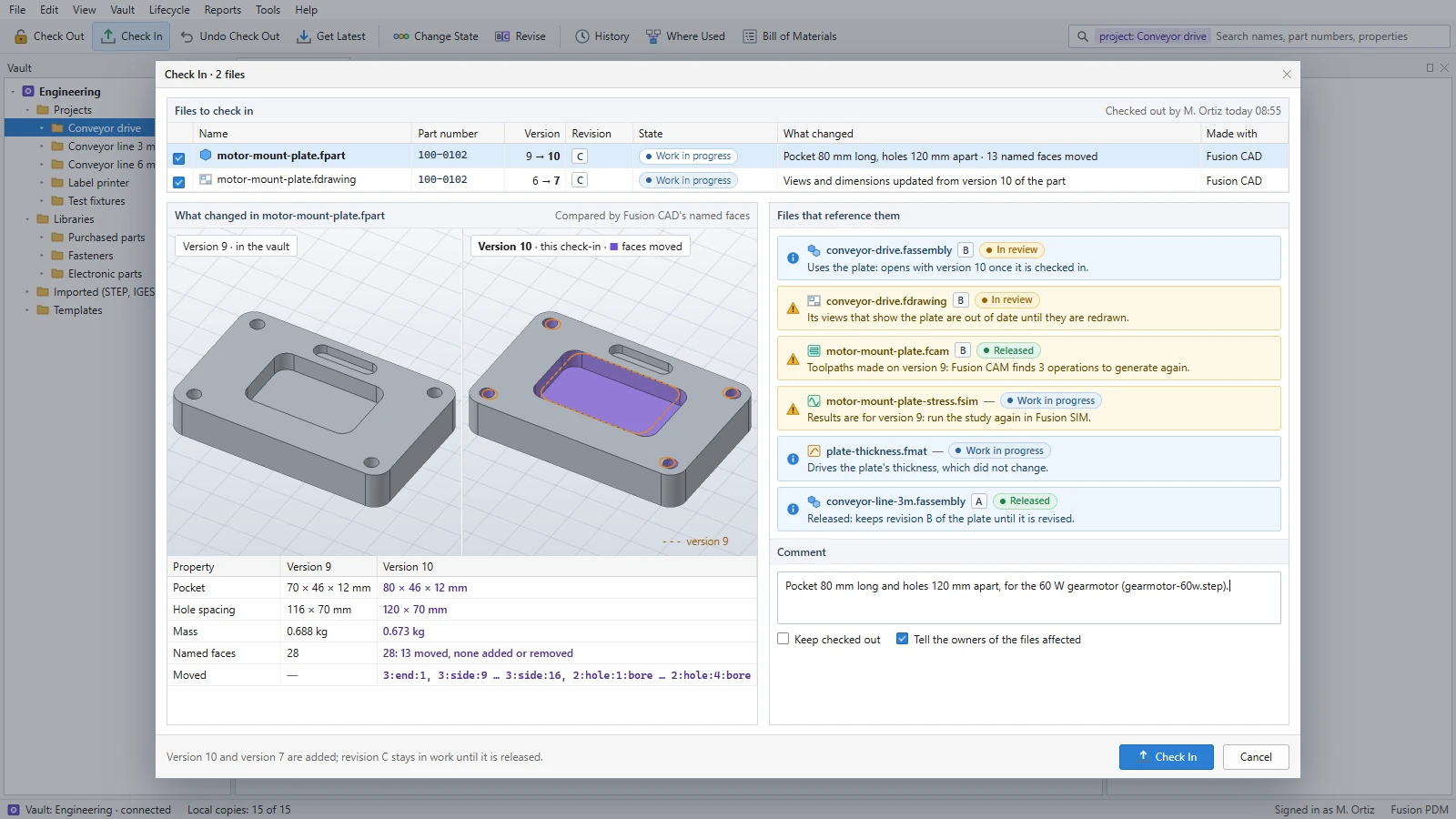
Check a file out to change it, and everyone else sees who has it while they keep opening it read-only. Every check-in adds a version. Before it does, Fusion PDM is planned to show what changed, compared by Fusion CAD's names for faces and edges, and every file the change reaches.Design mockup: checking in a longer pocket and a wider hole pattern, with the drawing, milling program and study they affect. Illustrative data.
Check-out and check-in
PLANNEDOne person changes a file at a time. Others see who has it out and since when, and can still open it.
Every version kept
PLANNEDEach check-in adds a version with its comment, author and time; any version can be opened again.
Changes you can see
PLANNEDVersions compared side by side, with the faces that moved named the way Fusion CAD names them.
Know what a change touches.
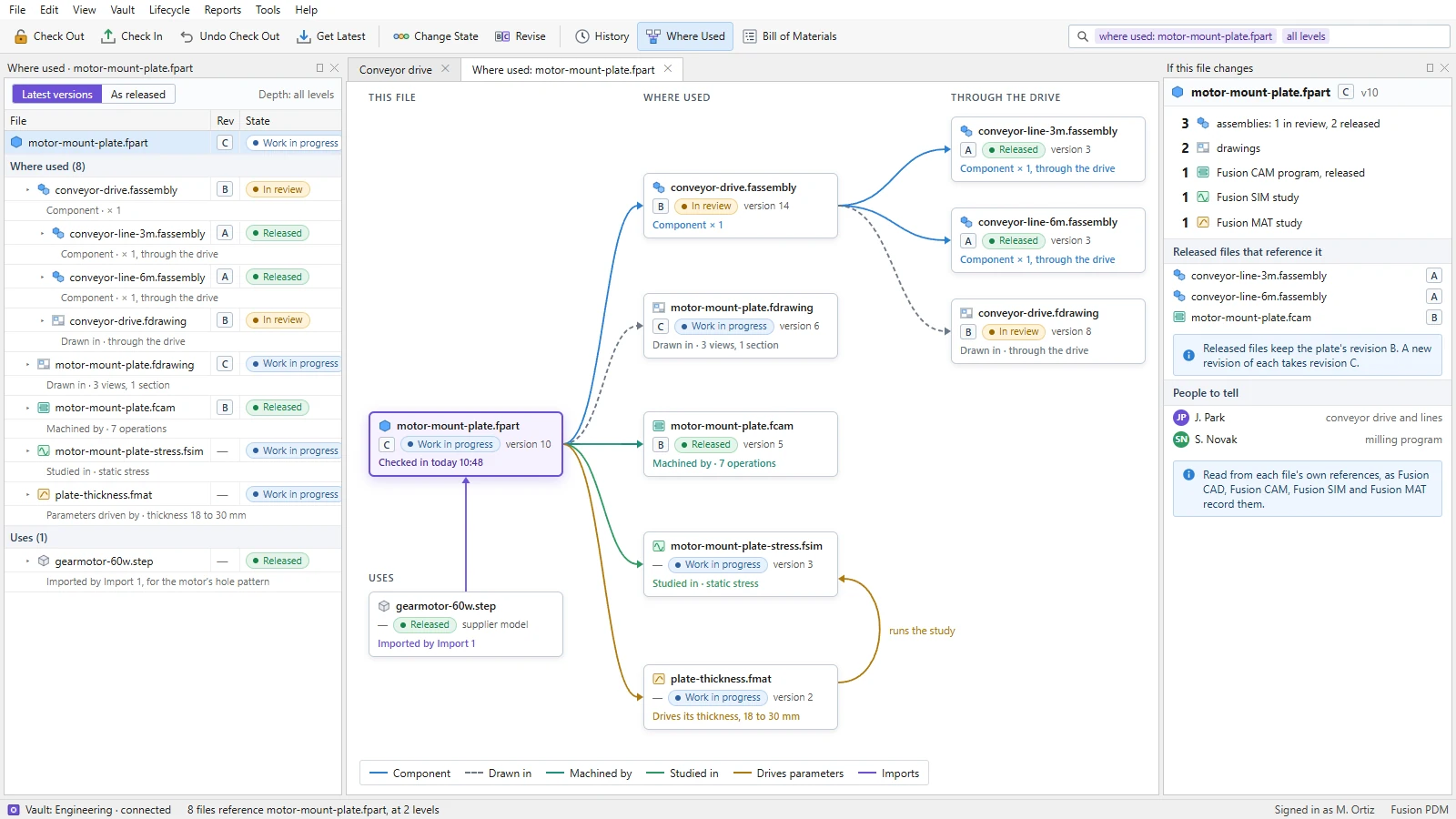
Fusion PDM is planned to keep each file's references: an assembly's parts, a drawing's models, a part's imports, a study's part, a program's part. It reads them through each product's recorded connection rather than guessing from file names, so where-used answers at every level, for the latest versions or as released.Design mockup: everything that uses the motor mount plate, across Fusion CAD, Fusion CAM, Fusion SIM and Fusion MAT. Illustrative data.
References from the products
PLANNEDFusion CAD's Pack and Go already follows a file's references to any depth. Fusion PDM keeps the same graph for the whole vault.
Where used, at every level
PLANNEDUp through assemblies and the lines they go into, and across to drawings, programs and studies.
Before you change it
PLANNEDWhich released files a change would need new revisions of, and whom to tell.
Release with approvals.
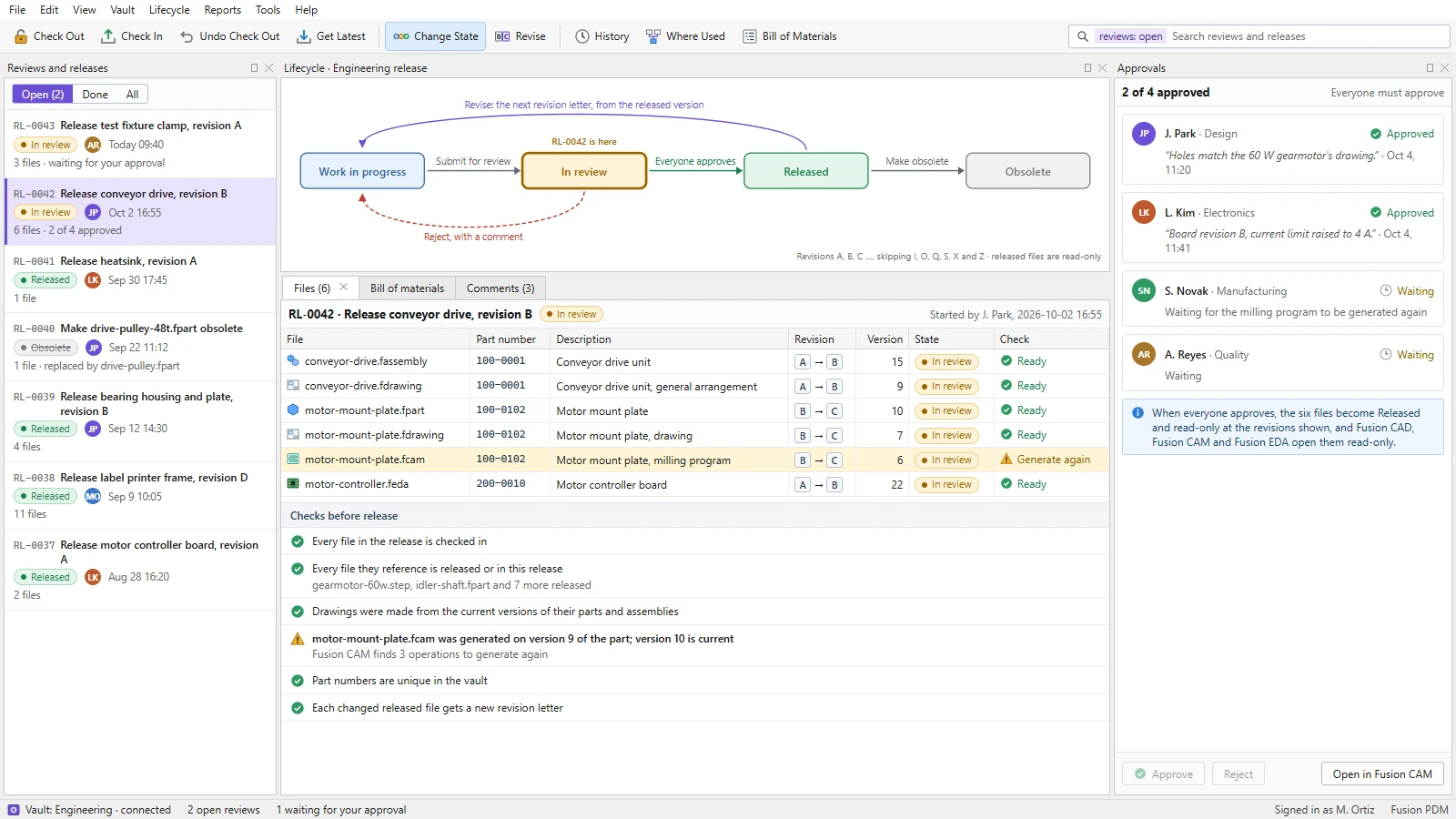
Files move through work in progress, in review, released and obsolete. A release gathers the files that go together, checks them, and waits for everyone it names to approve. Released files become read-only, and the next change starts a new revision.Design mockup: releasing the conveyor drive's revision B, held until the milling program is generated again. Illustrative data.
Lifecycle states
PLANNEDWork in progress, in review, released and obsolete, with the moves allowed between them.
Checks before release
PLANNEDEverything checked in, every reference released or in the release, drawings and programs made from current versions.
Revisions
PLANNEDRevision letters given at release, A, B, C and on, with released files kept read-only.
One bill of materials, mechanical and electronic.
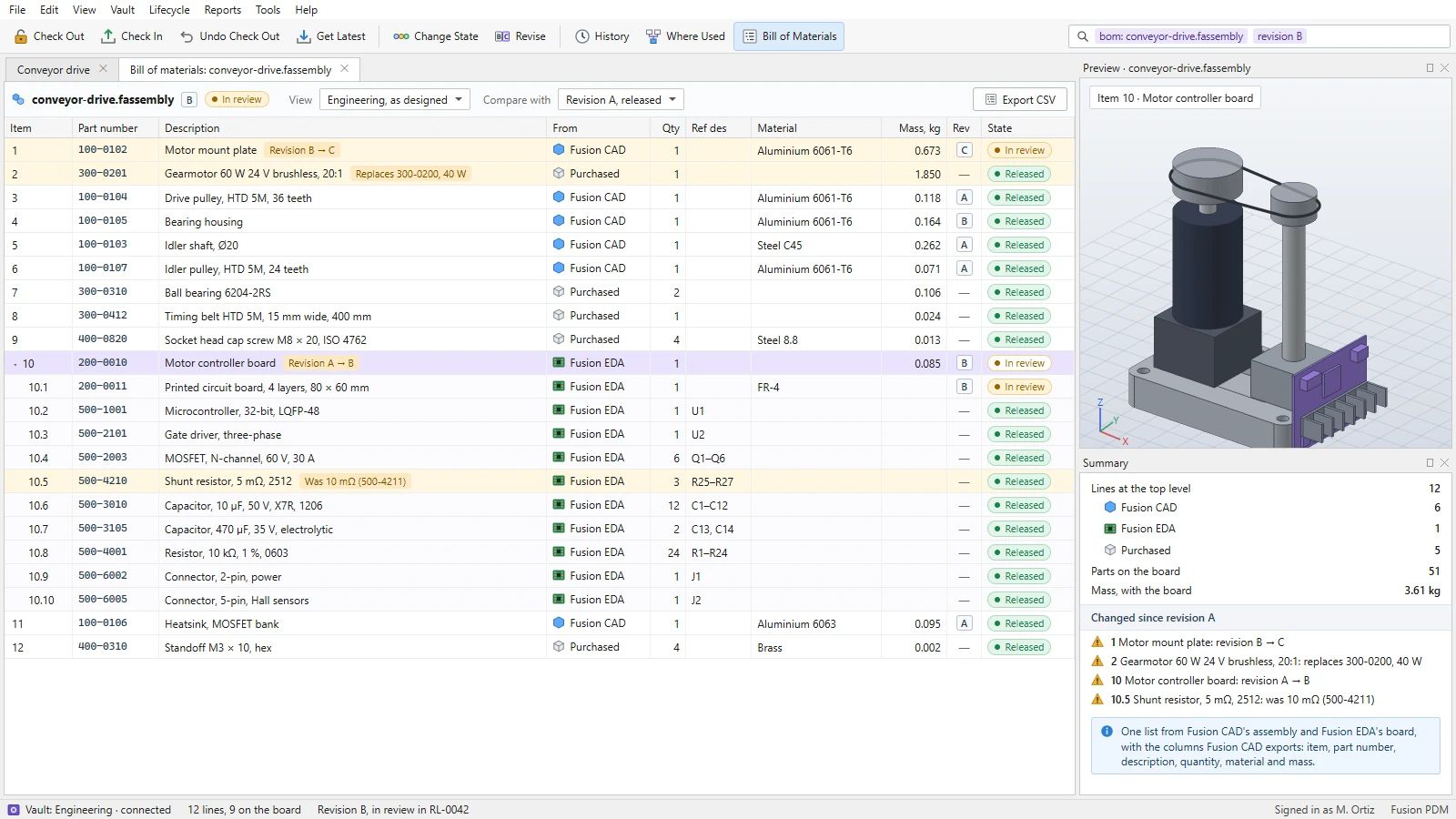
Fusion PDM is planned to build the bill of materials as designed from Fusion CAD's assemblies and Fusion EDA's boards, in one list: part numbers, descriptions, quantities, materials, masses and reference designators, each with its revision and state.Design mockup: the conveyor drive's parts and its controller board's components in one bill of materials. Illustrative data.
From Fusion CAD's assemblies
PLANNEDItems, part numbers, descriptions, quantities, materials and masses, the columns Fusion CAD already exports.
With Fusion EDA's boards
PLANNEDA board's components and reference designators under the board, in the same list as the parts around it.
Compared by revision
PLANNEDWhat was added, removed or replaced since the last release, and a CSV export.
PDM first, then PLM, on the same data.
Fusion PDM starts with the engineering team's files. It is designed to grow into product lifecycle management on the same data, so a company moves from one to the other without moving its data.
1 · The vault
PLANNEDFiles from every Fusion engineering product, check-out and check-in, and every version.
2 · References
PLANNEDEach file's references, read through the products' recorded connections, and where-used.
3 · Release
PLANNEDLifecycle states, approvals, checks and revisions, with released files read-only.
4 · Bill of materials
PLANNEDOne bill of materials as designed, across Fusion CAD's assemblies and Fusion EDA's boards.
5 · Search
PLANNEDFind files by name, part number, description, property and state, and keep the searches.
6 · And then PLM
ROADMAPChange requests and change orders, manufacturing bills of materials, suppliers, quality records and inspection, compliance and service.
Part of the Fusion platform.
Fusion CAD
Fusion's mechanical design product, whose parts, assemblies and drawings are at the centre of the vault.fusioncad.cloud →
Fusion CAM
Fusion's manufacturing product, whose programs follow the parts they machine.fusioncam.cloud →
Fusion 3D Engine
Fusion's core 3D engine, which will draw Fusion PDM's previews of parts and assemblies.fusion3d.cloud →
Fusion PDM is planned.
Fusion PDM is not built yet, and every screen on this page is a design mockup with illustrative data: the project, files, people, versions and numbers were made up for the mockups. Follow its progress, and the rest of the Fusion portfolio, on fusionsoftware.cloud.Visit fusionsoftware.cloudFusion PDM · Fusion Software LLC · 2026Fusion CADFusion SIMFusion MATFusion CAMFusion Software